Lecture 11 — Python Basic Commands Review Project
Lecture 11 — Python Basic Commands Review Project⌗
Instructor: Laksh Budhrani
Review / Recap⌗
Turtle Commands You Already Know⌗
| Command | Meaning (Simple) |
|---|---|
p.forward() | Move forward |
p.backward() | Move backward |
p.left() | Turn left |
p.right() | Turn right |
p.penup() | Lift the pen |
p.pendown() | Put the pen down |
p.pencolor() | Change line color |
p.pensize() | Change line thickness |
p.goto() | Move to a coordinate |
p.setheading() | Point the turtle in a direction |
p.circle() | Draw a circle |
p.begin_fill() | Start filling a shape |
p.end_fill() | Finish filling a shape |
p.fillcolor() | Set fill color |
p.dot() | Draw a dot |
p.shape() | Change turtle shape |
p.stamp() | Stamp the turtle shape |
p.turtlesize() | Resize the turtle icon |
p.speed() | Change drawing speed |
wn.bgcolor() | Change background color |
Input, Variables, Identifiers, Print & Comments (Quick Table)⌗
| Concept | Meaning (Simple) | Example |
|---|---|---|
| input() | Ask the user a question | name = input("Enter name: ") |
| int(input()) | Ask for a whole number | height = int(input("Enter height: ")) |
| variable | Stores a value | size = 100 |
| identifier | Name of a variable | wall_color, rocket_height |
| print() | Show text or values on the screen | print("Hello", name) |
| comment (#) | Note for humans, ignored by Python | # This draws the wall |
Objectives⌗
- Review Python basics learned so far
- Use input, variables, identifiers, print, and comments
- Build a Tricolor Flag Generator
- Submit your final drawing in Google Classroom
Your Task for Today⌗
You will not learn new commands today.
Instead, you will complete one required project using all Python basics learned so far.
Required Project — Tricolor Flag Generator⌗
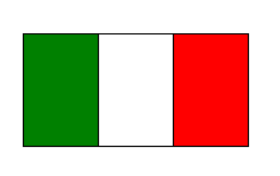
You must create a Tricolor Flag Generator using:
input()- variables
- identifiers
print()- comments
- turtle drawing methods
Your Task⌗
Ask the user for:
- Single stripe width → use
int - Flag height → use
int - Left stripe color
- Middle stripe color
- Right stripe color
Then:
Print two status messages before drawing:
--- GENERATING FLAG ---
Drawing 3 stripes side-by-side...
Draw three stripes, each using:
t.fillcolor()t.begin_fill()t.end_fill()t.forward()t.left()
- After drawing all stripes, print:
Flag generation complete!
Boilerplate Code⌗
Create a new Python file in VS Code named:
turtle_class11.py
import turtle as trtl

p = trtl.Turtle()
p.speed(0)

# --- ENTER YOUR CODE HERE ---
# (Write your Tricolor Flag Generator code here)


# --------------------------------------------------------------
# (Stop writing code above this line)

wn = trtl.Screen()
wn.mainloop()
Submission Instructions⌗
Submit your work in Google Classroom under:
Assignment 2 — Python Basic Commands Review Project⌗
Include:
- A Google Doc
- Your code pasted inside
- A screenshot of your final flag
- Turn it in before the deadline
Reminder⌗
This is your review assignment.
Use input, variables, identifiers, print, comments, and turtle methods together.
Have fun coding!