Lecture 2 — Turtle Pen Control & Movements
Lecture 2 — Turtle Pen Control & Movements⌗
Instructor: Laksh Budhrani
Review / Recap⌗
Basic Commands from Lecture 1⌗
| Command | Meaning (Simple) |
|---|---|
p.forward(steps) | Move the turtle straight ahead |
p.left(angle) | Turn the turtle left by that angle |
Objectives⌗
- Understand
penup()andpendown() - Learn how to turn using
right(angle) - Learn how to move backward using
backward(distance)
Objective 1 — penup() and pendown()⌗
Simple Definitions⌗
penup()— Move the turtle without drawing.pendown()— Put the pen down to start drawing again.
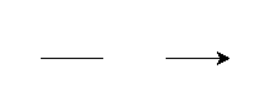
Example: Drawing Three Horizontal Lines⌗
import turtle as trtl

p = trtl.Turtle()

# --- ENTER YOUR CODE HERE ---
p.forward(50)
p.penup()

p.forward(50)
p.pendown()

p.forward(50)
# --------------------------------------------------------------
# (Stop writing code above this line)

wn = trtl.Screen()
wn.mainloop()
Objective 2 & 3 — right() and backward()⌗
Simple Definitions⌗
right(angle)— Turn the turtle clockwise by the given angle.backward(distance)— Move the turtle straight backward without turning.
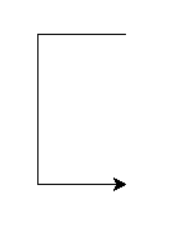
Example: Drawing a Simple Letter C⌗
import turtle as trtl

p = trtl.Turtle()

# --- ENTER YOUR CODE HERE ---
p.backward(70)
p.right(90)

p.forward(120)
p.left(90)

p.forward(70)
# --------------------------------------------------------------
# (Stop writing code above this line)

wn = trtl.Screen()
wn.mainloop()
House Drawing Activity (Guided)⌗
Create a new Python file in VS Code named:turtle_class2.py
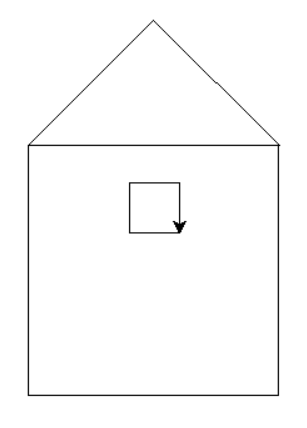
House Image⌗
Explain in Plain English⌗
Write a short explanation (3–5 sentences) describing how you think we can draw this house using:
forward()left()right()backward()penup()pendown()
Explain the steps in simple English, as if you are telling a friend how to draw it.
Boilerplate Code⌗
import turtle as trtl

p = trtl.Turtle()
p.speed(0)

# --- ENTER YOUR CODE HERE ---
# (Write your house drawing steps using the new commands)


# --------------------------------------------------------------
# (Stop writing code above this line)

wn = trtl.Screen()
wn.mainloop()
Notes⌗
- Use
penup()to move without drawing. - Use
pendown()to start drawing again. - Use
right()for clockwise turns. - Use
backward()if you need to reverse a little.
Independent Activity — Letter L Inside a Square⌗
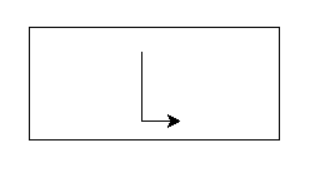
Letter L Image⌗
Your Task⌗
Look at the image above and draw it independently using:
forward(distance)left(angle)right(angle)backward(distance)penup()pendown()
Use the Turtle boilerplate code provided earlier in this lecture.
Create Your Own File⌗
Create a new Python file in VS Code named:
turtle_class2_independent.py
Inside that file, use the boilerplate and write your letter‑drawing code in the section marked:
# --- ENTER YOUR CODE HERE ---
Submission Instructions⌗
Submit your work in Google Classroom by:
- Creating a Google Doc
- Pasting your code into the document
- Adding a screenshot of the output window showing your drawing
- Turn in the Google Doc to the assignment titled In‑Class Exercise 2