Lecture 6 — Turtle Fill Colors & RGB
Lecture 6 — Turtle Fill Colors & RGB⌗
Instructor: Laksh Budhrani
Review / Recap⌗
Commands You Already Know⌗
| Command | Meaning (Simple) |
|---|---|
p.forward(steps) | Move the turtle straight ahead |
p.backward(steps) | Move the turtle straight backward |
p.left(angle) | Turn the turtle left |
p.right(angle) | Turn the turtle right |
p.penup() | Move without drawing |
p.pendown() | Start drawing again |
p.pencolor(color) | Change the pen color |
p.pensize(size) | Change the line thickness |
p.hideturtle() | Hide the turtle icon |
p.showturtle() | Show the turtle icon again |
p.goto(x, y) | Teleport the turtle to a coordinate |
p.setheading(angle) | Point the turtle in a specific direction |
p.circle(r) | Draw a full circle of radius r |
p.circle(r, a) | Draw an arc of angle a degrees |
p.circle(r, a, s) | Draw a polygon circle using s steps |
Objectives⌗
- Learn how RGB colors work
- Learn how to use fillcolor()
- Learn how to use begin_fill() and end_fill()
Objective 1 — RGB Colors in Turtle⌗
Simple Definition⌗
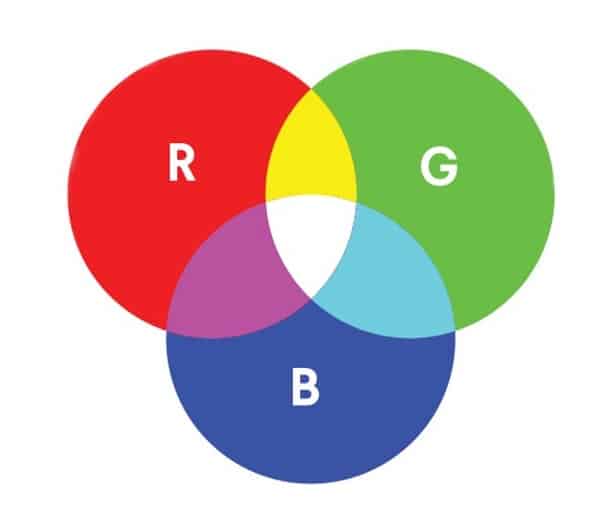
- RGB stands for Red, Green, Blue
- Each value goes from 0 to 255
- You can mix these three numbers to create any color
Syntax⌗
p.fillcolor( r, g, b )
p.pencolor( r, g, b )
Example:
p.fillcolor(0, 120, 255)   # bright blue
p.pencolor(255, 0, 0)      # red outline
RGB Venn Diagram⌗
Objective 2 — fillcolor()⌗
Simple Definition⌗
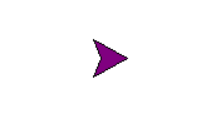
fillcolor()— Set the color used to fill shapes.
Example⌗
p.fillcolor("purple")
Objective 3 — begin_fill() and end_fill()⌗
Simple Definition⌗
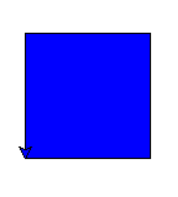
begin_fill()— Start filling the shapeend_fill()— Finish filling the shape
Example⌗
p.fillcolor("blue")
p.begin_fill()
p.forward(100)
p.left(90)
p.forward(100)
p.left(90)
p.forward(100)
p.left(90)
p.forward(100)
p.end_fill()
France Flag Activity (Guided)⌗
Create a new Python file in VS Code named:turtle_class6.py
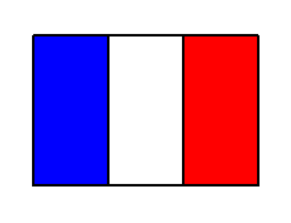
France Flag Image⌗
Explain in Plain English⌗
Write a short explanation (3–5 sentences) describing how you think we can draw the France flag using:
fillcolor()begin_fill()end_fill()goto()setheading()penup()pendown()forward()left()
Explain the steps in simple English, as if you are telling a friend how to draw it.
Boilerplate Code⌗
import turtle as trtl

p = trtl.Turtle()
p.speed(0)

# --- ENTER YOUR CODE HERE ---
# (Use fillcolor, begin_fill, end_fill, and RGB if you want)


# --------------------------------------------------------------
# (Stop writing code above this line)

wn = trtl.Screen()
wn.mainloop()
Notes⌗
- The France flag has three vertical rectangles
- Use
begin_fill()andend_fill()for each rectangle - Use
goto()to move to each section - Use RGB or color names
- Use
hideturtle()at the end for a clean final look
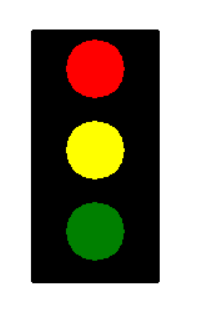
Independent Activity — Traffic Light Drawing⌗
Traffic Light Image⌗
Your Task⌗
Look at the image above and draw it independently using:
fillcolor()begin_fill()end_fill()circle(r)pensize()goto(x, y)penup()pendown()forward()right()hideturtle()
Use the Turtle boilerplate code provided earlier in this lecture.
Create Your Own File⌗
Create a new Python file in VS Code named:
turtle_class6_independent.py
Inside that file, use the boilerplate and write your traffic‑light code in the section marked:
# --- ENTER YOUR CODE HERE ---
Submission Instructions⌗
Submit your work in Google Classroom by:
- Creating a Google Doc
- Pasting your code into the document
- Adding a screenshot of the output window showing your drawing
- Turn in the Google Doc to the assignment titled In‑Class Exercise 6