Lecture 9 — Input, Variables & Identifiers
Lecture 9 — Input, Variables & Identifiers⌗
Instructor: Laksh Budhrani
Review / Recap⌗
Turtle Commands You Already Know⌗
| Command | Meaning (Simple) |
|---|---|
p.forward() | Move forward |
p.backward() | Move backward |
p.left() | Turn left |
p.right() | Turn right |
p.penup() | Lift the pen |
p.pendown() | Put the pen down |
p.pencolor() | Change line color |
p.pensize() | Change line thickness |
p.goto() | Move to a coordinate |
p.setheading() | Point the turtle in a direction |
p.circle() | Draw a circle |
p.begin_fill() | Start filling a shape |
p.end_fill() | Finish filling a shape |
p.fillcolor() | Set fill color |
p.dot() | Draw a dot |
p.shape() | Change turtle shape |
p.stamp() | Stamp the turtle shape |
p.turtlesize() | Resize the turtle icon |
p.speed() | Change drawing speed |
wn.bgcolor() | Change background color |
Any questions about the previous assignment?⌗
Ask now before we move on.
Objective⌗
Understand how to collect user input, store it in variables, and name variables correctly using identifiers.
- What is a variable
- How to name variables (identifiers)
- How input() collects information
Objective 1 — Variables⌗
A variable is a container that stores a value.
Examples:
car_length = 120
color = "blue"
wheel_radius = 20
Key Ideas:
• Variables store information
• You can use them later
Objective 2 — Identifiers (Variable Names)⌗
Identifiers are the names you give to variables.
Rules⌗
✔ Must start with a letter or underscore
✔ Can contain letters, numbers, underscores
✔ No spaces
✔ No special characters
✔ Case‑sensitive
✔ Should be meaningful
Correct Examples⌗
pizza_size
car_length
wheel_radius
crust_color
Wrong Examples⌗
2size        # cannot start with a number
car length   # spaces are not allowed
wheel-radius # hyphens are not allowed
@color       # special characters not allowed
Objective 3 — The input() Function⌗
What input() Does⌗
• Pauses the program
• Waits for the user to type something
• Continues after Enter is pressed
Basic Syntax:
input("Enter something: ")
VERY IMPORTANT — Rule of Thumb for Numbers⌗
When you ask the user for a whole number, Python does NOT automatically treat it as a number.
To make sure Python understands it correctly:
RULE OF THUMB⌗
Whenever you want a whole number, ALWAYS use:
int(input("Enter a number: "))
Examples⌗
car_length = int(input("Enter car length: "))
wheel_radius = int(input("Enter wheel radius: "))
pizza_size = int(input("Enter pizza size: "))
This keeps your program correct and prevents errors later.
Combine input + variables + identifiers⌗
Example:
color = input("Enter a color: ")
size = int(input("Enter a size: "))
Now you can use these values in Turtle.
Quick MCQs (Check Your Understanding)⌗
1. Which of the following is a correct identifier?
A. 2car
B. car length
C. car_length
D. car-length
2. What does input() do?
A. Draws a shape
B. Pauses and waits for user typing
C. Changes turtle color
D. Runs the program faster
3. If you want to ask the user for a whole number, what should you use?
A. input()
B. input() + number
C. int(input())
D. whole(input())
4. Which identifier is wrong?
A. pizza_size
B. crustColor
C. size2
D. pizza size
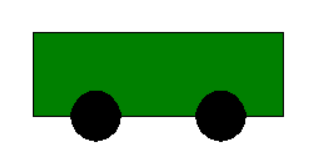
Guided Activity — Customizable Car⌗
Create a new Python file in VS Code named:turtle_class9.py
Image⌗
Requirements⌗
Ask the user for:
- Car length → use
int() - Car color → string
- Wheel radius → use
int()
Then draw a car using Turtle:
- Rectangle body (use car length)
- Filled color (use car color)
- Two wheels (use wheel radius)
Boilerplate Code⌗
import turtle as trtl

p = trtl.Turtle()
p.speed(0)

# --- ENTER YOUR CODE HERE ---
# (Write your drawing code in this section)


# --------------------------------------------------------------
# (Stop writing code above this line)

wn = trtl.Screen()
wn.mainloop()
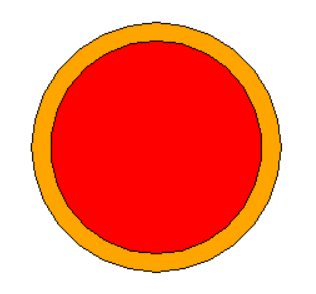
Independent Activity — Customizable Pizza Maker⌗
Pizza Image⌗
Your Task⌗
Ask the user for:
- Pizza size → use
int() - Crust color
- Cheese color
Then draw the pizza using:
- Two concentric circles
p.circle()p.begin_fill()p.end_fill()p.fillcolor()p.goto()penup()pendown()- etc.
Use the Turtle boilerplate code provided earlier in this lecture.
Create Your Own File⌗
Create a new Python file in VS Code named:
turtle_class9_independent.py
Inside that file, use the boilerplate and write your pizza code in the section marked:
# --- ENTER YOUR CODE HERE ---
Submission Instructions⌗
Submit your work in Google Classroom by:
- Creating a Google Doc
- Pasting your code into the document
- Adding a screenshot of the output window showing your pizza drawing
- Turn in the Google Doc to the assignment titled In‑Class Exercise 9