Assignment 2A — Comprehensive HTML Form Project
title: “Assignment 2A — Comprehensive HTML Form Project” weight: 12
Assignment 2A — Comprehensive HTML Form Project⌗
Instructor: Laksh Budhrani
Quick Recall: HTML Form Tags & Attributes Covered So Far⌗
Up until now, we have learned how to collect text, passwords, emails, and single/multiple choices using form controls! Here is the complete list of form tags and attributes we have mastered so far:
| Tag / Attribute | Type | Purpose | Example |
|---|---|---|---|
<form> | Paired Tag | Main wrapper container for all form controls | <form>...</form> |
<label> | Paired Tag | Displays text labeling a specific input field | <label>Name:</label> |
<input> | Unpaired Tag | Creates an interactive input field | <input type="text"> |
type="text" | Attribute Value | Creates a standard single-line text box | <input type="text"> |
type="email" | Attribute Value | Creates an input box tuned for email addresses | <input type="email"> |
type="password" | Attribute Value | Creates a masked text box that hides typed characters | <input type="password"> |
type="radio" | Attribute Value | Creates a single-choice round button | <input type="radio"> |
type="checkbox" | Attribute Value | Creates a multi-choice square box | <input type="checkbox"> |
<select> | Paired Tag | Main wrapper container for a dropdown menu | <select name="location"> |
<option> | Paired Tag | Single item/choice inside a dropdown list | <option value="online">Online</option> |
<textarea> | Paired Tag | Creates a multi-line text input box | <textarea name="msg"></textarea> |
name="..." | Attribute | Column header/label for saving field data in the backend | name="user_name" |
value="..." | Attribute | Text stored or pre-filled inside the input box / choice | value="Peter" |
rows="..." | Attribute | Sets the height of a text area in lines | rows="4" |
cols="..." | Attribute | Sets the width of a text area in characters | cols="30" |
Project Prompt: High School Club Registration Form⌗
Imagine you are launching a brand-new extracurricular club or interest group at school! Whether it is a Gaming Club, Art Society, Esports Team, Music Fan Club, or Coding Guild, you need to collect membership applications from fellow students.
Your task is to build a complete, single-page registration form where prospective members can submit all of their details!
Assignment Objectives⌗
- Build a fully structured HTML page using proper document setup (
<!DOCTYPE html>,<html>,<head>,<body>). - Integrate single-line text inputs, password fields, radio button groups, checkbox groups, dropdown menus, and multi-line text areas into a single
<form>. - Apply accurate
nameandvalueattributes across all interactive elements. - Render clear visually labeled sections using headings (
<h2>), paragraphs, and line breaks (<br>).
Assignment Requirements Checklist⌗
Your submission file assignment2a.html must contain ALL of the following requirements:
- 1. Page Setup: Set up a clean HTML structure with a descriptive
<title>and a main<h1>heading. - 2. Single Form Wrapper: Wrap all form elements inside ONE main
<form>container. - 3. Basic Information Inputs:
- Standard text input for Full Name.
- Email input for Email Address.
- Password input for Account Password / Security Code.
- 4. Radio Button Group (Single Choice):
- Ask for Grade Level (at least 3 choices: Freshman, Sophomore, Junior, Senior).
- All radio buttons must share the exact same
nameattribute.
- 5. Checkbox Group (Multiple Choice):
- Ask for Club Interests / Committees (at least 3 choices).
- Each checkbox must have a distinct
valueattribute.
- 6. Dropdown Menu (
<select>):- Ask for Preferred Meeting Time / Location (at least 3
<option>choices).
- Ask for Preferred Meeting Time / Location (at least 3
- 7. Multi-Line Text Area (
<textarea>):- Ask for Why do you want to join? using
rowsandcolsto set the size.
- Ask for Why do you want to join? using
- 8. Clean Labels: Every input field must have an accompanying
<label>tag.
Project Setup & Starter Template⌗
Instructions:⌗
- Open VS Code.
- Open your course workspace folder.
- Create a new file named
assignment2a.html. - Copy and paste the template below into
assignment2a.htmland write your HTML code inside the body!
<!DOCTYPE html>
<html>

<head>
    <title>Assignment 2A — High School Club Signup</title>
</head>

<body>
	<!-- START WRITING HERE -->


	<!-- STOP WRITING HERE -->
</body>

</html>
Expected Browser Output⌗
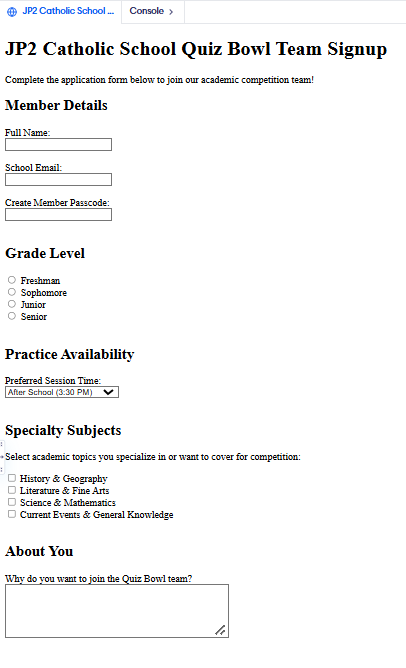
Here is an example preview. Your work should look similar to this when opened in a web browser:
Submission Instructions⌗
Submit your finished assignment in Google Classroom under Assignment 2A by following these steps:
- Copy your full HTML code from
assignment2a.html. - Open your course Google Doc and paste your code under the Assignment 2A header.
- Take a full-page screenshot of your rendered page in the browser and paste it directly below your code.
- Click Turn In on Google Classroom!