Lecture 8 — Advanced Tables: Merging Cells with colspan & rowspan
Lecture 8 — Advanced Tables: Merging Cells with colspan & rowspan⌗
Instructor: Laksh Budhrani
Quick Recall: Lectures 1–7 Review⌗
Before we learn how to span cells across multiple rows and columns, let’s review all the tags and attributes we’ve mastered so far!
| Tag | Associated Attributes | Type | Purpose | Example |
|---|---|---|---|---|
<h1> – <h6> | None | Paired | Headings of different sizes | <h1>Heading</h1> |
<p> | None | Paired | Text paragraph block | <p>Paragraph</p> |
<b>, <i>, <u> | None | Paired | Bold, Italics, Underline | <b>Bold</b>, <i>Italic</i>, <u>Underline</u> |
<mark>, <s> | None | Paired | Highlight, Strikethrough | <mark>Highlight</mark>, <s>Strike</s> |
<sup>, <sub> | None | Paired | Superscript, Subscript | 1<sup>st</sup>, H<sub>2</sub>O |
<!-- --> | None | Special | Hidden code notes/comments | <!-- Note --> |
<hr>, <br> | None | Unpaired | Horizontal rule divider, Line break | <hr>, <br> |
<img> | src, alt, width, height | Unpaired | Displays an image | <img src="pic.jpg" alt="Pic" width="200"> |
<a> | href, target (_blank / _self) | Paired | Creates clickable hyperlink | <a href="https://..." target="_blank">Link</a> |
<ul> | None | Paired | Creates an unordered (bulleted) list | <ul>...</ul> |
<ol> | None | Paired | Creates an ordered (numbered) list | <ol>...</ol> |
<li> | None | Paired | Defines an individual item inside a <ul> or <ol> | <li>Item</li> |
<table> | None | Paired | Main container wrapper for table content | <table>...</table> |
<tr> | None | Paired | Defines a single horizontal row | <tr>...</tr> |
<th> | None | Paired | Defines a bold, centered header cell | <th>Time</th> |
<td> | None | Paired | Defines a standard data cell | <td>8:00 AM</td> |
Class Check-In: Does everyone remember the Golden Rule of Tables? (All text must live inside a
<th>or<td>, never directly inside<tr>or<table>!)
The Story Continues…⌗
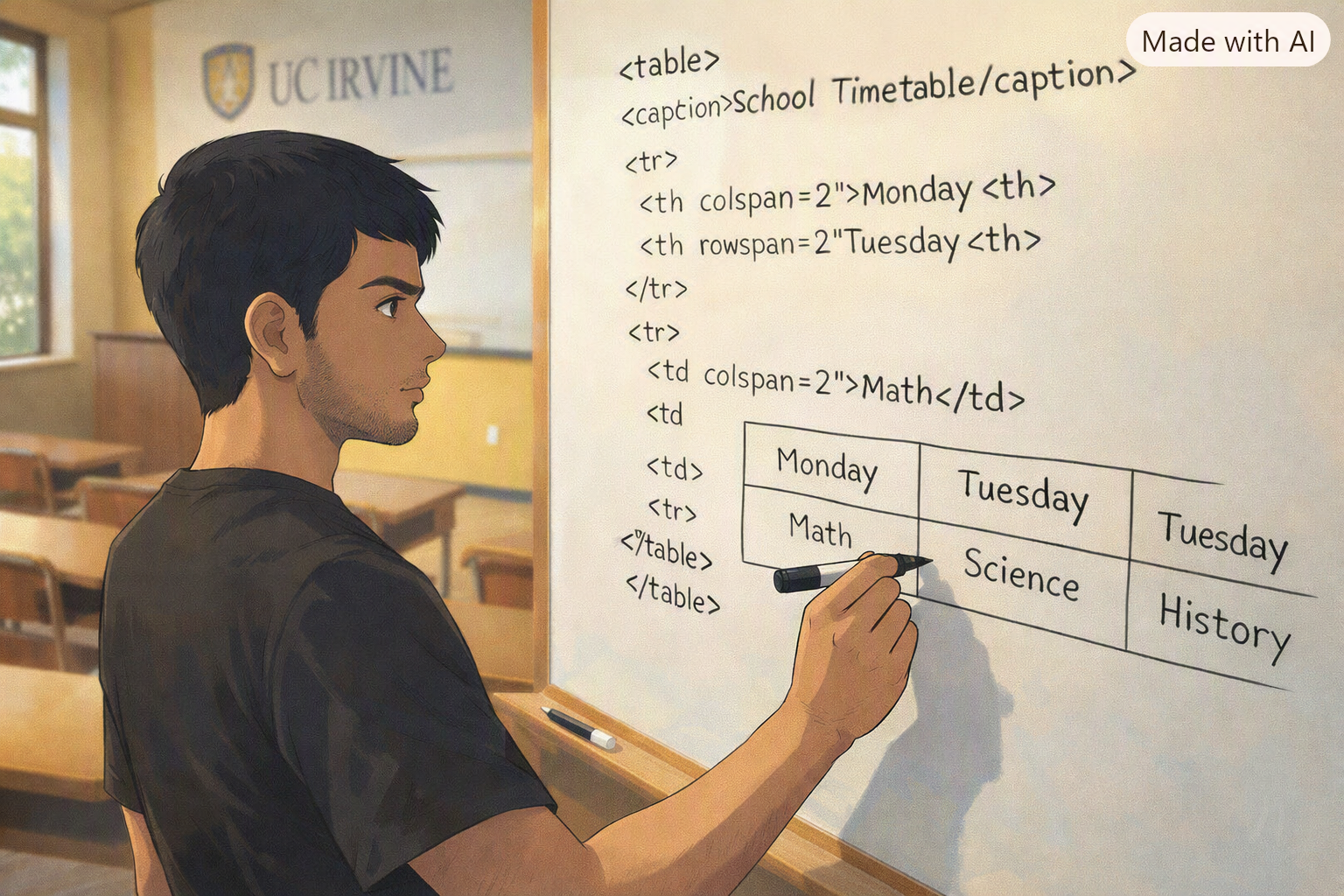
Sahil’s Week 8 Update!
Sahil’s schedule table looks super neat! But he ran into two small problems when updating his weekly timetable:
- He has a Lunch Break from 12:00 PM to 1:00 PM that spans across all 3 columns of his table.
- He has a 2-hour CS Lab on Tuesdays that stretches vertically across 2 time slots!
Creating separate empty boxes looks clunky. Sahil needs our help using cell merging attributes (
colspanandrowspan) insidesahil_day8.html!
Sahil’s Request for Today⌗
“Hey! I need to merge some table cells so my block schedule looks like a real university calendar!”
“Here is what I need you to help me build in
sahil_day8.html:”
- Horizontal Merge (
colspan): Create a single “Lunch Break” banner row that stretches horizontally across all 3 columns.- Vertical Merge (
rowspan): Stretch my 2-hour CS Lab cell vertically downwards so it covers 2 row time slots!
Objectives⌗
- Learn how to stretch cells horizontally across columns using
colspan - Learn how to stretch cells vertically across rows using
rowspan
Objective 1 — Column Span (colspan)⌗
Simple Definition⌗
The colspan attribute merges a single cell horizontally across multiple columns (left to right).
Code Example:⌗
Imagine a 3-column table (Name, Subject, Score). For the summary row at the bottom, we stretch “Total Grade” across 2 columns so it aligns with the score!
<table border = "1">
    <tr>
        <th>Student Name</th>
        <th>Subject</th>
        <th>Score</th>
    </tr>
    <tr>
        <td>Sahil</td>
        <td>Web Design</td>
        <td>95</td>
    </tr>
    <!-- 'Total Grade' spans across Column 1 & Column 2 -->
    <tr>
        <td colspan="2">Total Grade</td>
        <td>Pass</td>
    </tr>
</table>
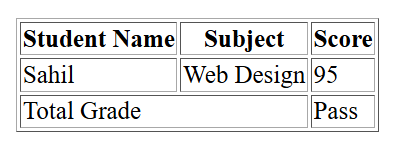
⚠️ Rule for
colspan: Becausecolspan="2"takes up 2 column slots, Row 3 only needs 2 total<td>tags instead of 3!
Objective 2 — Row Span (rowspan)⌗
Simple Definition⌗
The rowspan attribute merges a single cell vertically down across multiple rows (top to bottom).
Code Example:⌗
Imagine a schedule where a lab class takes up 2 full hours (8:00 AM to 10:00 AM). We stretch the course box down into the next time slot!
<table border = "1">
    <tr>
        <th>Time Slot</th>
        <th>Class Name</th>
        <th>Room</th>
    </tr>
    <!-- 8:00 AM Slot: Lab starts here and spans down 2 rows -->
    <tr>
        <td>8:00 AM</td>
        <td rowspan="2">2-Hour CS Lab</td>
        <td>Rm 251</td>
    </tr>
    <!-- 9:00 AM Slot: Notice no 'Class Name' cell here! -->
    <tr>
        <td>9:00 AM</td>
        <td>Rm 251</td>
    </tr>
</table>
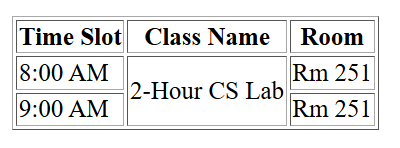
⚠️ Rule for
rowspan: Because “2-Hour CS Lab” stretches down into the 9:00 AM row, the 9:00 AM<tr>only needs 2<td>tags!
Guided Activity — Building Sahil’s Block Schedule⌗
PART 1 — Project Setup⌗
- Open VS Code.
- Go to File → Open Folder and select your
Sahil_Projectfolder. - Create a new file named:
sahil_day8.html.
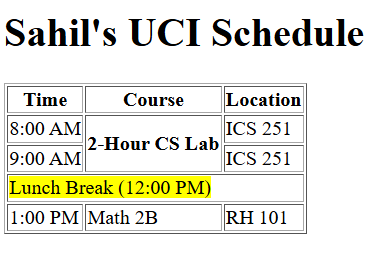
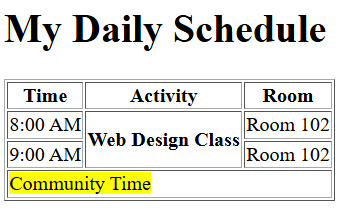
PART 2 — Expected Browser Output⌗
Here is what Sahil’s completed block schedule will look like once we write the HTML together:
PART 3 — Starter Code (We will write the content together live!)⌗
Paste this starter boilerplate into sahil_day8.html. We will fill in the <body> together in class!
<!DOCTYPE html>
<html>

<head>
    <title>Sahil's Block Schedule</title>
</head>

<body>
    <!-- START WRITING HERE -->


    <!-- STOP WRITING HERE -->
</body>

</html>
Independent Activity — My Custom Block Schedule!⌗
Now it’s your turn! Upgrade your schedule tracker by merging cells for long classes, study halls, or lunch breaks.
Instructions:⌗
- Open your
Portfoliofolder in VS Code. - Create a new file named
portfolio_day8.html. - Copy the starter template above into your file and build your page using
<table>,colspan, androwspan.
Your Portfolio Prompt⌗
Your page must include the following 3 requirements:
- Table Structure: Set up a clean schedule table with 3 columns (Time, Course, Location).
- Use
colspan: Create at least 1 horizontal banner cell spanning across all 3 columns. - Use
rowspan: Create at least 1 vertical cell stretching down across 2 rows for a 2-hour class or block period.
Example Solution⌗
Submission Instructions⌗
Submit your work in Google Classroom under In‑Class Exercise 8 by:
- Opening your Google Doc from previous lectures.
- Pasting your HTML code from both
sahil_day8.htmlandportfolio_day8.html. - Adding screenshots of both rendered pages from your browser.
- Turning in the document!
Summary: New Attributes Learned Today⌗
| Attribute | Belongs To | What It Does | Example |
|---|---|---|---|
colspan | <th> or <td> | Merges cells horizontally across columns | <td colspan="3">Wide Cell</td> |
rowspan | <th> or <td> | Merges cells vertically down across rows | <td rowspan="2">Tall Cell</td> |